Your Cart 🛒
Ihr Einkaufswagen ist im Moment leer.
Looks like you haven't added anything yet!

Global eSIM
Nov 05, 2025
Planning your next international trip? Before you go, discover if your device supports eSIM technology—the modern, hassle-free way to stay connected worldwide without physical SIM cards.
For international travelers, eSIM technology is a game-changer. No more hunting for local SIM cards at airports, no more swapping tiny cards and risking losing them. With an eSIM-compatible device, you can activate a data plan instantly—even before you land—and enjoy seamless connectivity in 190+ countries. Global eSIM has already helped over 100,000 travelers stay connected effortlessly.
EID (Embedded Identity Document) is a unique 32-digit identifier embedded in your device's hardware. Think of it as your eSIM's serial number—it's the digital fingerprint that proves your phone has eSIM capability built in.
💡 Key Point: If your device displays an EID number, congratulations! Your phone is eSIM-ready and can activate digital data plans instantly. No EID? Your device only supports traditional physical SIM cards.
The fastest way to check—takes just 10 seconds!
⚡ Quick Note: Don't worry—this code does NOT place a phone call. It simply displays your device information on screen.
Step 1: Open your Phone app (the green icon with a phone handset)
Step 2: Tap on the Keypad/Dial Pad tab at the bottom
Step 3: Enter this exact code:
*#06#
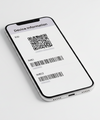
Step 4: A screen will automatically pop up showing your device information
You'll see several numbers displayed:
If there's no EID listed, your device doesn't have eSIM capability.
Prefer navigating through settings? Here's how for both iPhone and Android.
 For iPhone Users:
Step 1: Open the Settings app
Step 2: Tap General
Step 3: Tap About
Step 4: Scroll down until you see EID
💡 Pro Tip: You may need to tap "Tap to show info" or similar text to reveal the full EID number. If you see the EID field, your iPhone is eSIM-compatible!
 For Android Users:
Step 1: Open the Settings app
Step 2: Tap About phone (or About device)
Step 3: Look for EID in the list
📱 Note: The exact menu path may vary slightly depending on your Android manufacturer (Samsung, Google Pixel, OnePlus, etc.). Some devices show EID under Status or SIM status within the About phone section.
Even if your iPhone supports eSIM, it needs to be unlocked to use international eSIM plans. Here's how to check:
1. Go to Settings > General > About
2. Scroll to Carrier Lock
3. If it says "No SIM restrictions", you're good to go! If it shows a carrier name, contact your carrier to unlock your device.
Now that you've confirmed your device is eSIM-ready, you're just minutes away from seamless global connectivity!
✅ Step 1: Verify your device shows an EID number (you just learned how!)
✅ Step 2: Browse Global eSIM's flexible data plans for 190+ destinations
✅ Step 3: Purchase and receive your eSIM QR code instantly via email
✅ Step 4: Scan, activate, and enjoy instant connectivity when you land!
🌟 Join 100,000+ Happy Travelers Who Trust Global eSIM
Reliable coverage • Instant activation • No hidden fees • 24/7 support
🌍
190+ Countries
Global coverage wherever you roam
⚡
Instant Activation
Connect in seconds, not hours
💰
Flexible Plans
Pay only for what you need
🛡️
Trusted Service
100,000+ satisfied travelers
📌 Save This Guide: Bookmark this page and share it with fellow travelers! Knowing your device's eSIM compatibility is the first step to stress-free international connectivity.
Global eSIM